How to see Vinted sold prices when Vinted keeps no sold archive
Vinted keeps no public archive of sold items, so no Vinted filter shows what a pair sold for. You can see the asking prices of live items and your own sales. To get Vinted sold prices for a style code and size, follow the search over time. The Market panel of RestocksAIO does that for you about every 6 hours.
 The RestocksAIO teamOperators, not flippers
What Vinted shows a seller
Vinted search lists items for sale. It has no sold filter and no price history of past sales. Your own sales are in your Vinted orders, but they show only your prices.
The asking price is also not the price paid. Vinted buyers can make offers, so a pair listed at 340 can sell for less. An asking price tells you what sellers want. A sold price tells you what buyers paid, and Vinted does not publish it.
How to see sold items on Vinted by hand
The manual method has three steps. Search the style code or the model, and filter by your size. Note each item and its price. Come back a few days later and open each item that left the results.
An item can leave the results for four reasons. It sold, the seller deleted it, the seller hid it, or a buyer reserved it. Only the item page tells you which. For one pair this takes minutes. For 20 pairs on two Vinted sites, it becomes a daily job.
How RestocksAIO tracks Vinted sold prices
RestocksAIO Market data does the same check on a schedule. Open the Publish Composer, select an offer, click Market and tick Track on Vinted. The first read starts at once.
About every 6 hours, the app reads the 50 newest results of the search, as a visitor. It records the id, the price and the first-seen time of each item. When an item leaves the results, the app reads its page. Only a sold or closed item counts as a sale. An active, removed or hidden item leaves the tracking and is not a sale. A reserved item that stays out of the results for 7 days also leaves the tracking.
The reads never use your Vinted account or its session, and nothing is written to Vinted. RestocksAIO follows the search only while the app runs.
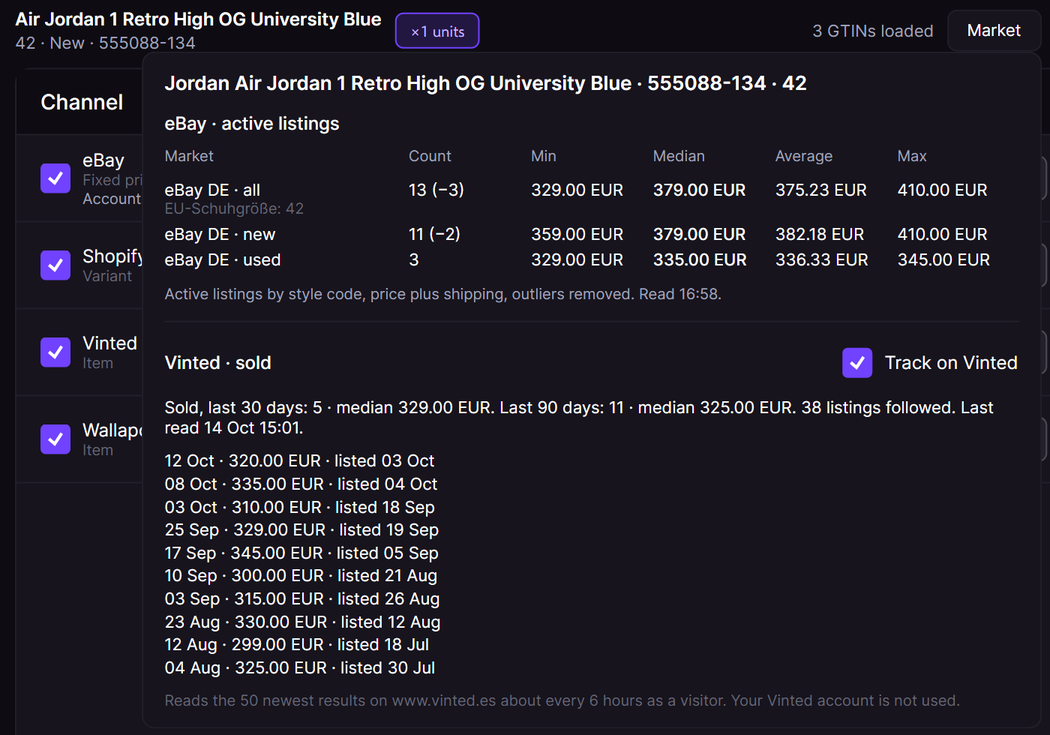
Read the 30-day and 90-day medians
The panel shows the number of sales and the median price of the last 30 days and of the last 90 days. It also shows how many listings it follows and the time of the last read. Each recent sale has its sale date, its price and its listing date. The gap between the two dates shows how long the pair took to sell.
Treat the median as a close guide, not an exact figure. Vinted shows no final sale price, so the app records the last listing price that the search showed. A buyer can have paid less after an offer.
Above the Vinted rows, the panel shows the active eBay fixed-price listings of the same size, with outliers removed. eBay sold prices are not available, because eBay gives sold data only through an API that it restricts.
FeatureMarket dataVinted sold prices and eBay asking prices beside the price you set.Limits of the Vinted price checker
| Limit | Value |
|---|---|
| Tracked products for each Vinted site | 20 |
| Results read for each search | 50 newest |
| Time between two reads of one search | About 6 hours |
| Sold history | 90 days |
The Vinted site is the site of the Vinted account of the offer. Without one, the app uses your first Vinted account, else www.vinted.es. If Vinted shows a bot check or a rate limit, the app pauses its reads on that site for 24 hours. Clear Track on Vinted to stop, and the app deletes the sold history of that product.
The Market panel is part of the Publish Composer, in the Premium plan. It is in the macOS app and the new Windows app.
Related reading
All articles
Vinted crosslisting for sneaker resellers after October 2026
A large crosslisting tool closed Vinted to new users on 2 October 2026. How a sneaker seller now lists pairs on 22 Vinted sites with own photos, stock sync and one inventory.
Repricing without a race to the bottom
Payout floors, max payouts and market indicators: how to stay the lowest ask without giving margin away every time you get undercut.
How to compare net payouts across marketplaces before you buy
Whether to buy depends on the payout. Here's how to check what a pair will net you on every marketplace you sell on, before you pay for it.