RestocksAIO
Home/Solutions/Trading card reselling software
Solution - Operating layer

Trading card inventory & reselling software for sealed product and box lots

Marketplace card inventory is often a catalogue of sealed sets rather than loose cards: booster boxes, collection boxes, packs and multi-box lots such as 2x, 4x or 10x configurations. RestocksAIO keeps those products and supported singles in one catalogue, then connects eligible listings, pricing rules and confirmed sales where the marketplace catalogue and seller account support them. Manual entry and CSV are the dependable intake paths; barcode lookup applies only when the exact product resolves in the database.

Illustrative sealed-product operationA sealed lot lists like any other item — once you find its identity

A photo and a rough name are not a listing. Set, product format, language and lot quantity resolve into one exact catalogue product, and from there it routes like a sneaker.
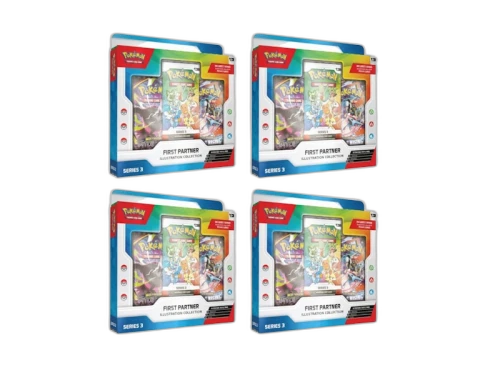
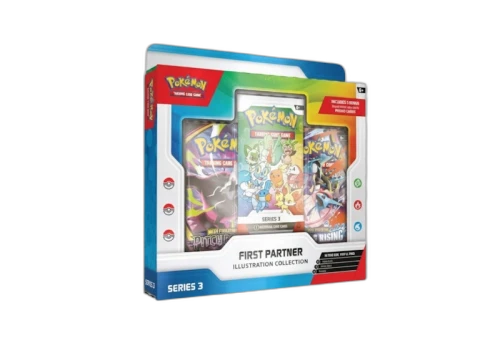
Pokémon First Partner Illustration Collection Series 3 Box — 4× lot4× lot
Sealed lot at intakePhoto + rough name only
Resolve the catalogue identity
setFirst Partner Illustration · Series 3formatBoxlanguageENlot4×
Pokémon First Partner Illustration Collection Series 3 Box catalogue image
2026 First Partner Illustration Collection Series 3 Box — 4× LotExact catalogue match · eligible on connected routes

Card volume breaks the spreadsheet that worked at fifty SKUs.

What RestocksAIO replaces

  • A sheet of sealed sets, boxes, packs and multi-box lots that's wrong by closing
  • Re-keying each product line, set, language and lot quantity into every listing by hand
  • Reading StockX sealed-product asks one SKU at a time before you price
  • Guessing which box or lot is still live on which marketplace
  • Stock counts that have no idea what already sold overnight
Operating path

From sealed intake to live listing

Set, product format, lot quantity and listing all reference the same catalogue SKU.

Add the stock

Add the exact booster box, collection box, pack or multi-box lot by manual entry or CSV; use barcode lookup only when that product resolves in the database.

Group the SKU

Each sealed-product or lot configuration sits as one grouped SKU with eligible marketplace listings attached.

List eligible products

Push inventory-linked listings to StockX when the exact set, box, pack or lot exists in the catalogue and the connected seller account is eligible.

Reprice & track payout

Where supported, Bricker holds prices to a floor and payout tracking follows confirmed card sales.

What stays connected

Built for the part of cards that actually scales

Pick an area to see what RestocksAIO handles inside it.
IntakeIntake paths that do not depend on a barcode match

Card products vary widely, so manual entry and CSV remain available when a scan or lookup does not resolve.

Manual entry

Add a card SKU with the details and cost you maintain.

CSV import

Prepare a larger intake batch in a structured file.

Conditional barcode lookup

Use scanning only when the product barcode resolves.

Cost & quantity

Keep cost and count attached to the owned unit.

InventoryOne grouped catalogue for sealed products and supported cards

Booster boxes, collection boxes, packs, multi-box lots and supported singles sit together, with eligible listings connected to the owned unit.

Owned stock

Quantity and cost tracked per sealed-product or card SKU.

Grouped SKUs

Each product format and lot size keeps its supported listings under one unit.

Active listings

See which boxes, packs, lots or supported singles are live and where.

Marketplace context

Per-platform payout on the row.

ListingsListed only where cards trade

Cards go to the marketplaces that carry them, not every sneaker site.

Eligible StockX listings

List only products available to the connected seller account.

Inventory-linked

Listings draw straight from owned stock.

CSV listing

Import card listing data where a file is faster.

Mass Editor

Edit price and state across many cards at once.

PricingRepricing with payout floors

Where the account and marketplace allow automated pricing, payout floors keep the seller's minimum in control.

Payout floors

The minimum payout a card may drop to.

Price comparator

Review supported marketplace payout context before pricing.

Per-SKU controllers

Rules scoped to a card and marketplace.

24/7 watching

Adjusts where the account and marketplace allow.

Payout trackingSupported card sales, accounted for

Confirmed sales feed payout and profit visibility without a weekly export.

Sales tracking

Confirmed card sales feed the numbers live.

Payout per SKU

Cost, payout and margin on each sealed product, lot or supported card SKU.

Sales export

Pull confirmed sales data out when accounting needs it.

Export ready

Pull data out when accounting needs it.

Before / after

The same sealed catalogue, without repeated data entry

With trading-card products, the manual cost is rebuilding set and lot records and losing trust in the count.
Daily task
Manual workflow
With RestocksAIO
Add a sealed-product drop
Type each set, box format, lot quantity and cost into a sheet.Slow at volume
Manual entry and CSV keep cost and quantity on the owned unit; barcode is optional when supported.
Intake
List an eligible box or lot
Recreate the listing on each marketplace by hand.Repeats per SKU
Inventory-linked listing keeps the exact product and lot configuration tied to the owned unit on supported accounts.
Listings
Price a supported sealed SKU
Read the StockX ask per box, pack or lot before you set a price.Blind otherwise
Comparator + Bricker hold the price to the floor you set.
Pricing
Reconcile an overnight sale
Decrement the count by hand and hope it holds.Drifts out of sync
A confirmed sale decrements the right sealed-product or lot SKU automatically.
Payout tracking
Product evidence

One owned unit, with its actions attached

The shared inventory interface used across supported product categories.
Inventory actions run from the owned-unit record. Card listing and pricing availability still depends on the marketplace catalogue and the connected seller account.
Works with these marketplaces
StockX
Operating posture

What it is - and what it isn't

Plain about scope so the buyer knows exactly what they're adopting.
Item-agnostic
Engine
The same inventory, listing and pricing engine for cards as for any SKU.
Cards-only
Outlets
StockX publishes a trading-card catalogue; the connected account remains the source of truth for eligible actions.
No grading
Scope
It runs your card business; it doesn't grade, slab or authenticate cards.
Not a bot
Checkout
No automated buying. Listing and pricing stay within marketplace rules.
FAQ

Before you start

Short answers to what buyers ask first.
Which marketplaces carry trading cards?
StockX publishes trading-card categories for sealed boxes, graded singles, packs and eligible ungraded singles. RestocksAIO does not expand a marketplace catalogue or grant seller permissions: the product must exist in the supported catalogue and the connected account must be allowed to perform the requested action. Check the StockX platform page and the connected account before building a card workflow around listing or repricing.
Does RestocksAIO grade or authenticate cards?
No. There is no grading, slabbing or authentication feature, and no PSA or grading-company integration. RestocksAIO manages the operating record around a card: inventory, eligible marketplace listings, supported pricing and confirmed sales. Grading stays with the grader and authentication stays with the marketplace. Manual entry and CSV remain available when a card has no supported barcode match.
Can I manage sealed boxes, packs, lots and supported singles together?
Yes, as inventory records. A booster box, collection box, pack, 2x or 4x lot, graded single or eligible ungraded single can carry its own SKU, cost and quantity in the same catalogue. Marketplace-facing work should centre on the exact products available in the marketplace catalogue, which is often dominated by sealed sets and multi-box lots. Listing, repricing and sale actions remain conditional on that catalogue and the seller account's permissions.
Is the card engine different from the sneaker tool?
No - it is the same software. RestocksAIO's inventory model keys off your SKUs and the marketplace, not whether the product is a sneaker or a sealed card box. That means booster boxes, packs, multi-box lots and supported singles can sit beside other stock in one catalogue. Marketplace actions remain category- and account-dependent, and barcode intake is conditional on exact product coverage.
Does it track card sales and payouts?
Yes, for supported marketplace sales loaded into the product. Confirmed sales can feed payout and profit visibility with cost, payout and margin attached to the SKU, and the data can be exported when accounting needs it. Coverage follows the connected marketplace account, so verify card-sale support before assuming every channel or card type will reconcile automatically.

Get the card catalogue off the spreadsheet.

Review current plan availability for intake, inventory, eligible listings and supported payout tracking on the pricing page.